

|
Help Centre
Click or search below to find all the common questions asked by our members and visitors.
Top Frequently Asked Questions
Can I play in a competition before my Golf ID card arrives?

Will I be able to play in competitions at golf clubs around Australia?
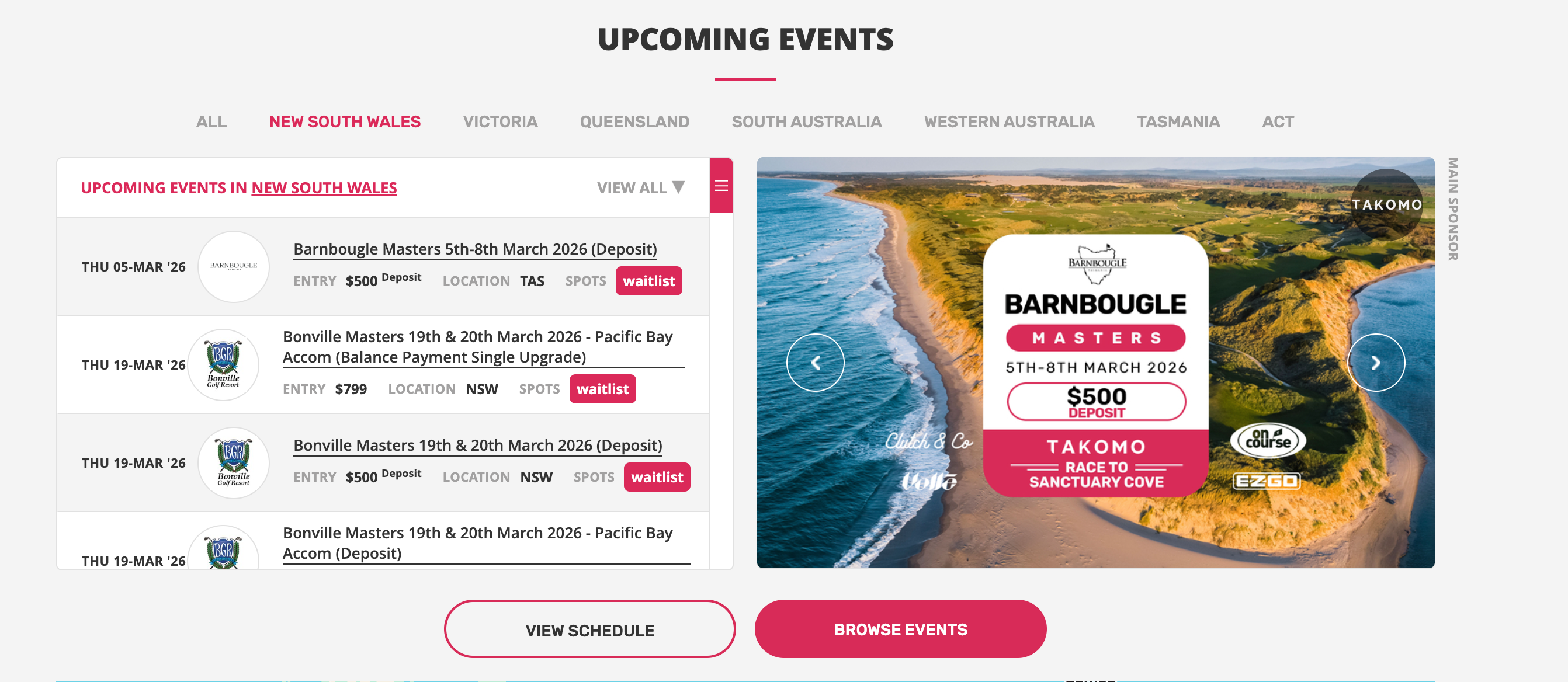
Each golf club has nominated competition days and you may be welcome to enter as a guest depending on the club's policy on accepting guests into their competitions. You will need to ask the golf club if their competition days are open to guests generally and to Golfer Social Club Members specifically. You may also seek to play in Open Tournaments and other Open events Another option is to get involved with our very own Golfer Tour Events. We offer over 100+ events annually all across Australia with price points to cater for a variety of budgets.
As a Golfer Social Club member you can use your monthly credit towards these events and also obtain discounted entry fees. These events are open to new golfers and experienced golfers alike. Our experienced events team will pair you with like-minded and abilities individuals if entering solo or you can book a whole group. To get involved with the Golfer tour simply navigate to the Tour website.
|

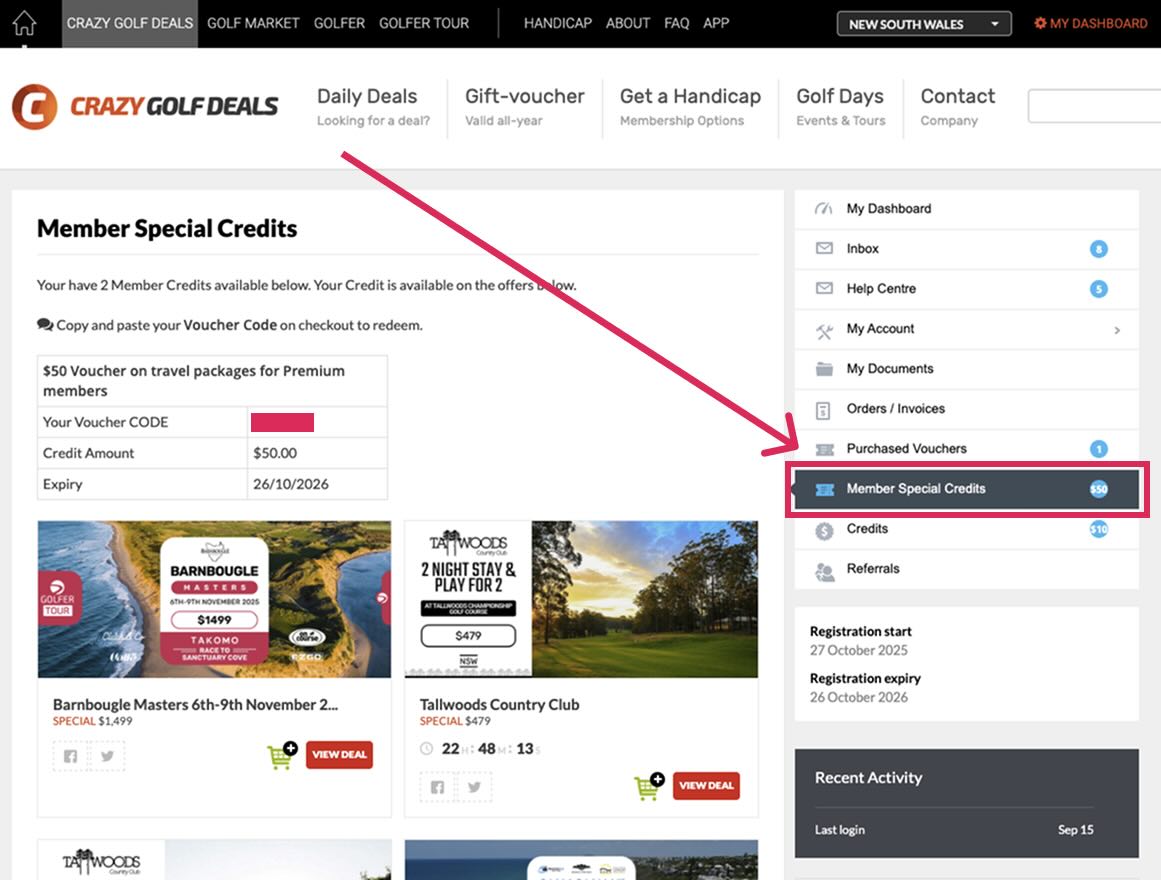
How do I receive my $10 monthly Credit for Crazy Golf Deals?
Your monthly $10 monthly credit is automatically placed directly into your Crazy Golf Deals Account and applied on checkout, when available. It is to be used within 30 days and does not accrue. It can be used on any deal on crazygolfdeals.com.au including Golfer Tour events and Stay and Plays, as well as Golf Market. If you're a Premium Member, you can find your special credits in your account under the category "Member Special Credits". These require you to copy and paste your voucher code on checkout.
|

Once I have a handicap, can I add Social scores to my playing history?
As part of our Handicap and Handicap+ memberships, you get the ability to upload what are called ‘conforming social scores’. Handicap members may upload a total of 10 social rounds per membership year, Handicap+ members have no restrictions on the number of rounds uploaded. The steps to do this are below. Note: under Golf Australia and World Handicapping System any rounds for handicapping need to be played with or accompanied by another player who holds an active Golf ID.
|

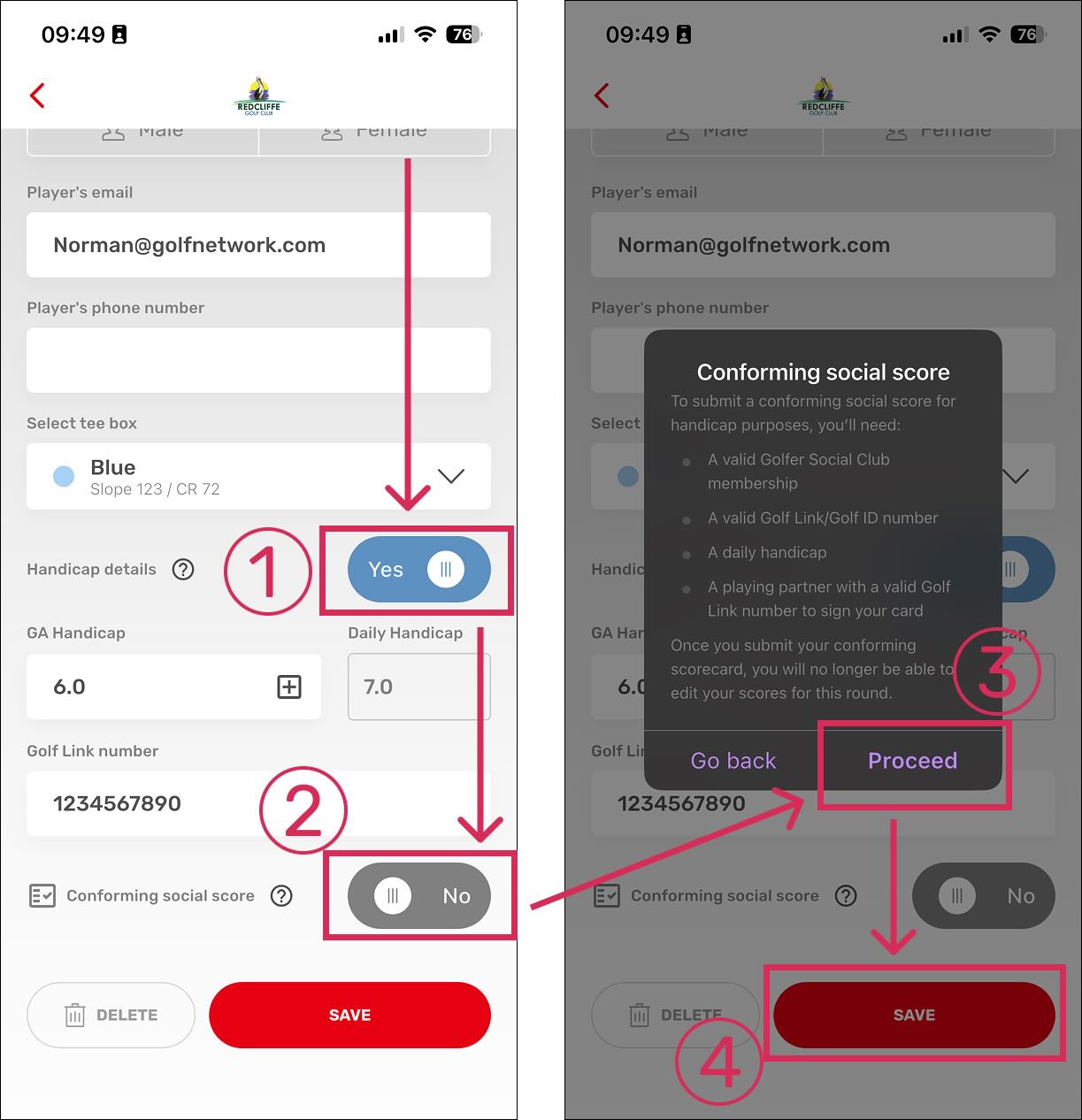
How do I submit a Conforming Social Score via the Golfer app?
Submitting a Conforming Social Score via the Golfer app is an easy process, when you start your round, just ensure your handicap information is correct and switch the toggle for a CSS. 1. Ensure you toggle the Handicap details and your GA Handicap and Golf ID number are correct. 2. Toggle the "Conforming social score" button 3. Read the notice and press "Proceed" 4. Press the "Save" button to continue and start your round 5. After your round, have your playing partner digitally sign your card and submit your round
Watch the help video here: |
If I have held a handicap at another club, am I obliged to submit my previous Golf ID (previously known as Golflink) number?
In late 2025 Golf Australia transitioned from the Golflink handicapping system to the DotGolf system. Under the Golflink system:
However, under the current Golf Australia Connect / Golf ID system (post-2025):
So essentially, the old statement about “getting a new GOLFLink number at a new club” no longer applies — your Golf ID now follows you for life, across all clubs. |
What is the GA Handicap and what is the Daily Handicap?
A GA Handicap is the Golf Australia Handicap that is assigned to a golfer. This handicap is then referenced against The Slope Rating of a set of tees on a golf course to calculate the Daily Handicap that a golfer plays from in a competition. |
How long does a handicap through The Golfer Social Club last for?
Memberships with the Golfer Social Club last for 12 months from the date of sign-up. As part of our Handicap and Premium+ Membership categories you will receive an Australian Golf ID number (previously called GOLF Link numbers) and official World Handicapping System handicap. If you’ve previously held a Golf ID (or Golflink number) we will be able to reactivate this upon sign up. If you haven’t held one before, we’ll issue you one. It's a common misconception that Golf ID’s and/or Golflink numbers expire. This isnt the case so its always best (and due process) to let us know if youve previously held one. Australian Golf ID numbers do not expire — they are a unique identifier that stays with you for your lifetime as a golfer in Australia. Key points
So unlike some membership numbers that might expire after a period of inactivity, an Australian Golf ID does not expire — it stays yours permanently. |

Can I get my new Golf ID number before I have submitted my scorecards?
If you’ve previously held a Golf link number or Golf ID number, we’ll simply reactivate it and your old record. You can indicate this one the sign-up page. If you can’t remember your number, you should be able to obtain it from the Club you were a member of previously.
To activate a first-time handicap, you need to complete three steps: application, payment, and 54 holes of scorecards. These scorecards can be entered through any combination of 9 and/or 18-hole rounds.
Our standard process is to wait until all three steps are completed before activating the golfer’s entity on Golf Connect (Golf Australia’s Handicap Platform). However, some golfers prefer to receive their Golf ID number before submitting their scorecards. In these cases, the handicap will appear as ‘Pending’ on Golf Connect until 54 holes of scores are entered on the golfer’s playing history.
Rounds for handicap can be scored and submitted via our app (instructions below) or scored on a manual scorecard scored by and marked by another player with an active Golf ID.
For more information, visit: https://golfnetwork.com.au/how-do-i-submit-a-conforming-social-score-via-the-golfer-app/4550
Once you’ve submitted 54 holes of compliant scorecards Golf Australia will automatically issue you with a handicap. You can then view your handicap record on the golf.com.au website. Note you may need to register first using your Golf ID number.
|


How are Australian Golf Handicaps calculated?
Golf Australia uses the World Handicap System (WHS) to calculate your official GA Handicap. This global system ensures your handicap is fair, consistent, and recognised at every affiliated course in Australia and overseas. When you enter your scores, whether in a competition or a social round with a marker, the WHS adjusts them for course difficulty and automatically updates your handicap. Your handicap travels with you, whether you’re playing at your local club or teeing up internationally. This system gives every golfer, from beginner to low-marker, a fair shot in competitions. It responds quickly to improvements in your game, and because it’s a global system, your GA Handicap is trusted everywhere you play. Golf Australia uses a few key steps to determine your handicap:
NOTE: When a player is gaining a handicap a sliding scale of score differentials is used (see table below). As a result of this your handicap will likely fluctuate quite a bit as you’re submitting your first 20 round. |